How Letterboxx works

From email newsletters to a local Mac reading library.

Letterboxx connects to the mail account you already use, imports newsletter copies from the folders you choose, and gives those copies a calmer place to read, organize, highlight, search, and keep.

Letterboxx Mac app showing a newsletter library with Letterboxxes, filters, newsletter list, and reader pane

The model

Your email account keeps the originals. Letterboxx keeps the reading copies.

Letterboxx is not a full live mirror of Mail, Gmail, or Outlook. It is a local-first newsletter library that uses selected mail folders as sources for the newsletters you want to read later.

Email still handles

Communication and account truth

  • original messages in Gmail, iCloud, Outlook, or IMAP
  • replies, forwarding, sending, and account settings
  • everyday mail, receipts, alerts, and work threads
  • mail folders or labels you already use

Letterboxx handles

Newsletter reading and recall

  • local newsletter copies from selected folders
  • topic-based Letterboxxes and reading filters
  • Clean View, highlights, search, and Message Diagnostics
  • encrypted backups for the library you build

Step by step

The Letterboxx workflow in four steps.

Step What happens Why it matters
Connect Add Gmail or an IMAP account such as iCloud, Outlook, DreamHost, or a custom mail server. Letterboxx can see the folders where newsletters arrive.
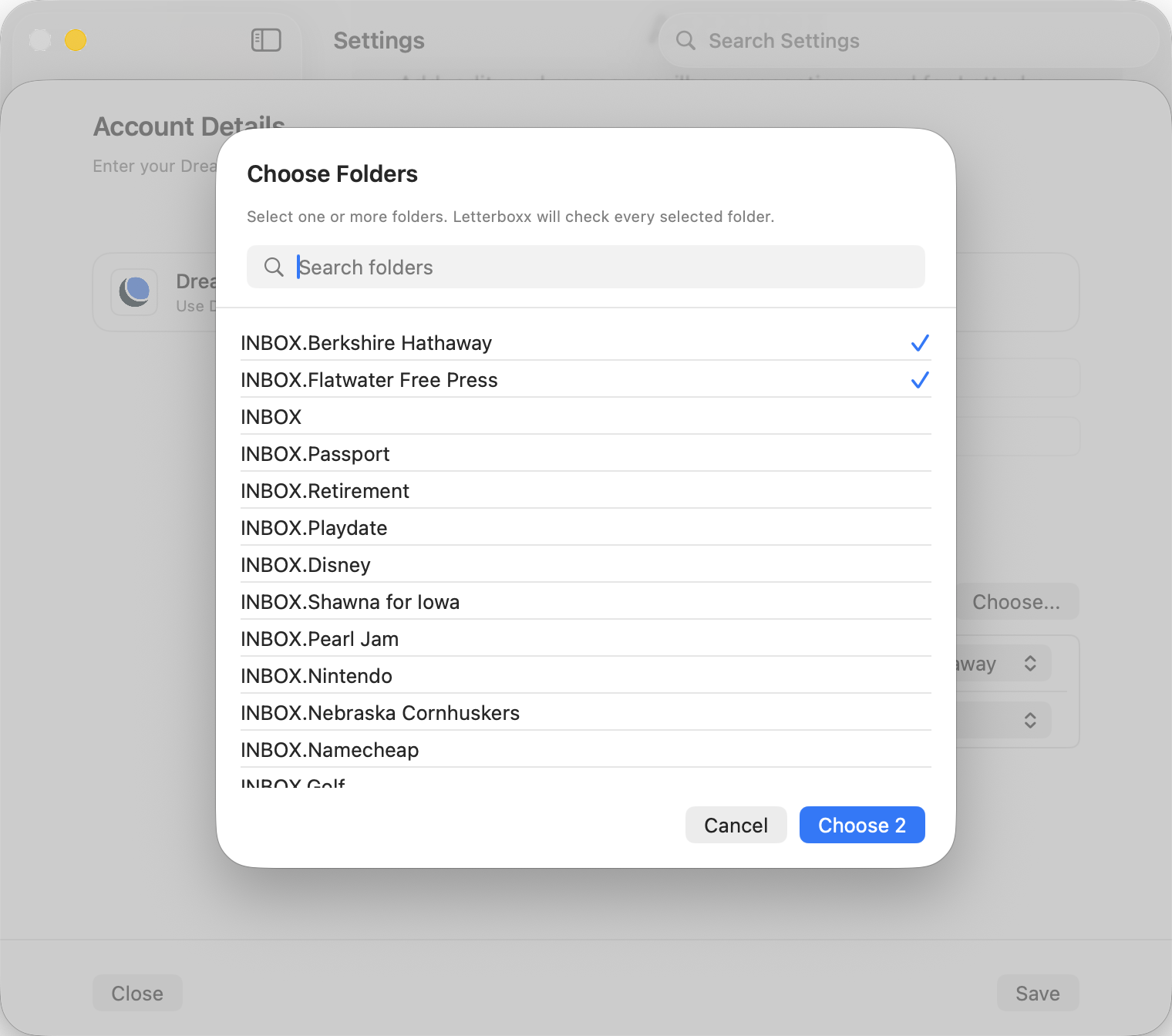
Choose Select the folders or labels that contain newsletters you actually want to read. The app imports newsletter sources, not every message in the account.
Import Letterboxx downloads local copies into your Mac library while originals stay in email. Your inbox remains familiar, and newsletters get a dedicated reading home.
Read Organize with Letterboxxes, use Clean View, save highlights, search, and back up the library. Newsletters become a collection you can return to instead of a pile to clear.

Folder choice

Start with the folders that already mean newsletter.

Some people have a Gmail label for newsletters. Some use an iCloud folder. Some have several topic folders. Letterboxx works best when the source folders are intentional, because the app is building a reading library rather than copying a whole inbox.

  1. Pick a source. Choose the folder or label where a set of newsletters already collects.
  2. Choose a destination. Send imports to Letterboxx Inbox or directly into a topic-based Letterboxx.
  3. Adjust later. Add more folders as you learn which subscriptions belong in your reading library.
Letterboxx folder chooser for selecting newsletter folders to import

After import

What changes after newsletters become a library.

The original newsletter still exists in email. The copy in Letterboxx gets reading tools that make it easier to finish, organize, remember, and protect.

Reading tools

Make long newsletters easier to finish.

  • open newsletters in a dedicated Mac reader
  • switch to Clean View for calmer reading when HTML is messy
  • inspect source and Clean View details in Message Diagnostics

Library tools

Keep good ideas findable later.

  • create Letterboxxes around topics, writers, or projects
  • highlight passages worth remembering
  • search imported newsletter copies and protect them with backups

Questions

How Letterboxx works FAQ

Does Letterboxx replace my email app?

No. Letterboxx is a dedicated Mac app for reading and organizing newsletter copies. Your normal email app still handles everyday mail, replies, sending, and account management.

Does Letterboxx move my original newsletters?

No. Letterboxx imports local copies from selected folders. The original messages stay in Gmail, iCloud, Outlook, or your IMAP account.

Does importing newsletters mark them read?

No. Normal import uses a read-safe fetch. Read/unread exchange only happens if you choose an account read-status mode that sends or syncs read status.

Can I choose only one newsletter folder?

Yes. Start with one folder or label, then add more later. Letterboxx is designed around selected newsletter sources.

Build the library

Give the newsletters you keep a place built for reading.

Connect the account you already use, choose the newsletter folders that matter, and let Letterboxx turn copies into a calm Mac reading library.

Download on the Mac App Store